Live Session app v1.1.63: Capture thoughts and screenshots with the Companion
The Companion keeps thought captures you can copy as Markdown or share by secret link; push to talk takes any key, screenshots wait a delay you set, and Chief reads more file types. Notch prompts fold away, onboarding explains each permission, and imported transcripts stay in their own session with correct speaker labels.
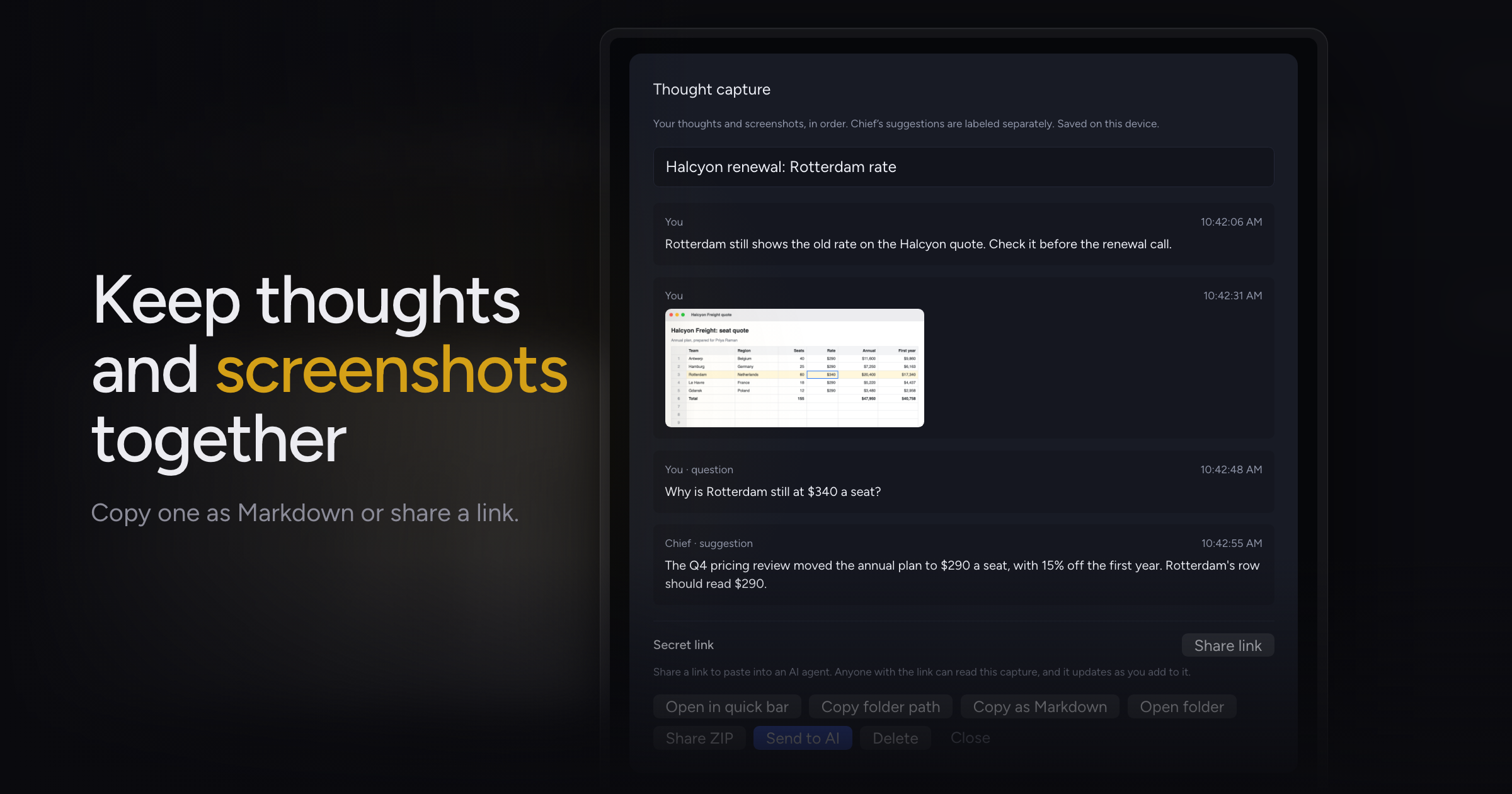
Jotting down an idea with a screenshot or two meant pasting pieces into other apps by hand, and push to talk worked only with a short list of keys.
Today, we're adding thought captures in the Companion, along with push to talk on any key, a screenshot send delay, more file types, notch prompts that fold away, and clearer onboarding permissions.
Thought captures in the Companion
The Companion keeps a thought capture of what you type, say and screenshot, in order, with Chief's suggestions labeled separately. Open one to rename it, preview its screenshots full size, and read it back. Chief saves captures on this device, and Show Captures in Chief in the menu bar menu opens the list.
Copy as Markdown puts the whole capture on your clipboard, each screenshot linked by its file's path, ready to paste into an AI tool. A shortcut pastes an open capture, and you can change it in Settings.
Under Secret link you can share a capture, update the link after the capture changes, or stop sharing it. People who open the link see the capture in order and can copy or download it as Markdown.
Deleting a capture removes it from this device and stops its link working, and you cannot undo it. An unsent draft stays out of copies and shared links.
Any push-to-talk key
The Push to talk row in Settings records any key or shortcut: a shortcut like ⌘⇧0, an F-key, a modifier held alone on either side, or modifiers held together. Hold the key to ask out loud, or double tap it to listen hands free.
F-keys and shortcuts need no permission. Chief refuses keys that type or act in other apps and tells you why.
Scrolling cancels a hold that has not started talking yet, and leaves one that has started alone.
On Windows, Right Shift, Alt or Win alone, Ctrl+Alt, Alt+Shift, Ctrl+Shift and F12 are not available.
Screenshot send delay
The Send on its own row sets how long a screenshot you ask Chief about waits for a question before it sends, from 1 second to an hour. It starts at 10 seconds, up from 5. Turn it off and the screenshot waits until you send it.
More file types
Chief reads old Office formats, RTF, OpenDocument and iWork files, and TIFF, BMP and GIF images, billed like a .docx. Chief transcribes .3gp and .mov files, and lists an email's non-text attachments by name.
Zip and other archives and old .xls files are no longer accepted, and very large or complex workbooks can fail to process. Uploading files & supported file types covers the list.
Notch prompts that fold away
On the macOS notch, the meeting prompt to start a Live Session and the calendar card for an upcoming meeting fold to the notch when you hover them and move away, as Chief's suggestions do. Hover the folded prompt to open it again, even with Chief in front. While you search for a project in the prompt, it stays open.
The Live Session paused prompt still stays up until you answer it.
Permissions explained in onboarding
The Permissions step marks Microphone and System Audio as Required and Accessibility as Optional. Each says what it lets Chief do and what you lose without it.
Fixes
- Opening another Live Session while an imported transcript was still building its summary showed the import's summary in that session, and its lines could land there too. The import's transcript and summary now stay in the imported session.
- Imported transcripts dropped the last speaker's lines and mislabeled the others. Each speaker's lines now keep the right label.
Update to 1.1.63 and open the Companion to start your first capture. Uploading an existing transcript covers imports.