Live Session app v1.1.54: Crop images on a canvas
Crop canvas images and drag them back to full size, rename speakers after a call, use screen context on Windows, open chat links on the chat with one menu per chat, jump through Activity, and see upcoming calls on Home mid-session. Fixes cover in-app cards, unsaved documents, reopened credit totals, late calendar cards, Activity times, accepted offers, shared links, tab dropdowns, notch canvases and Resume.
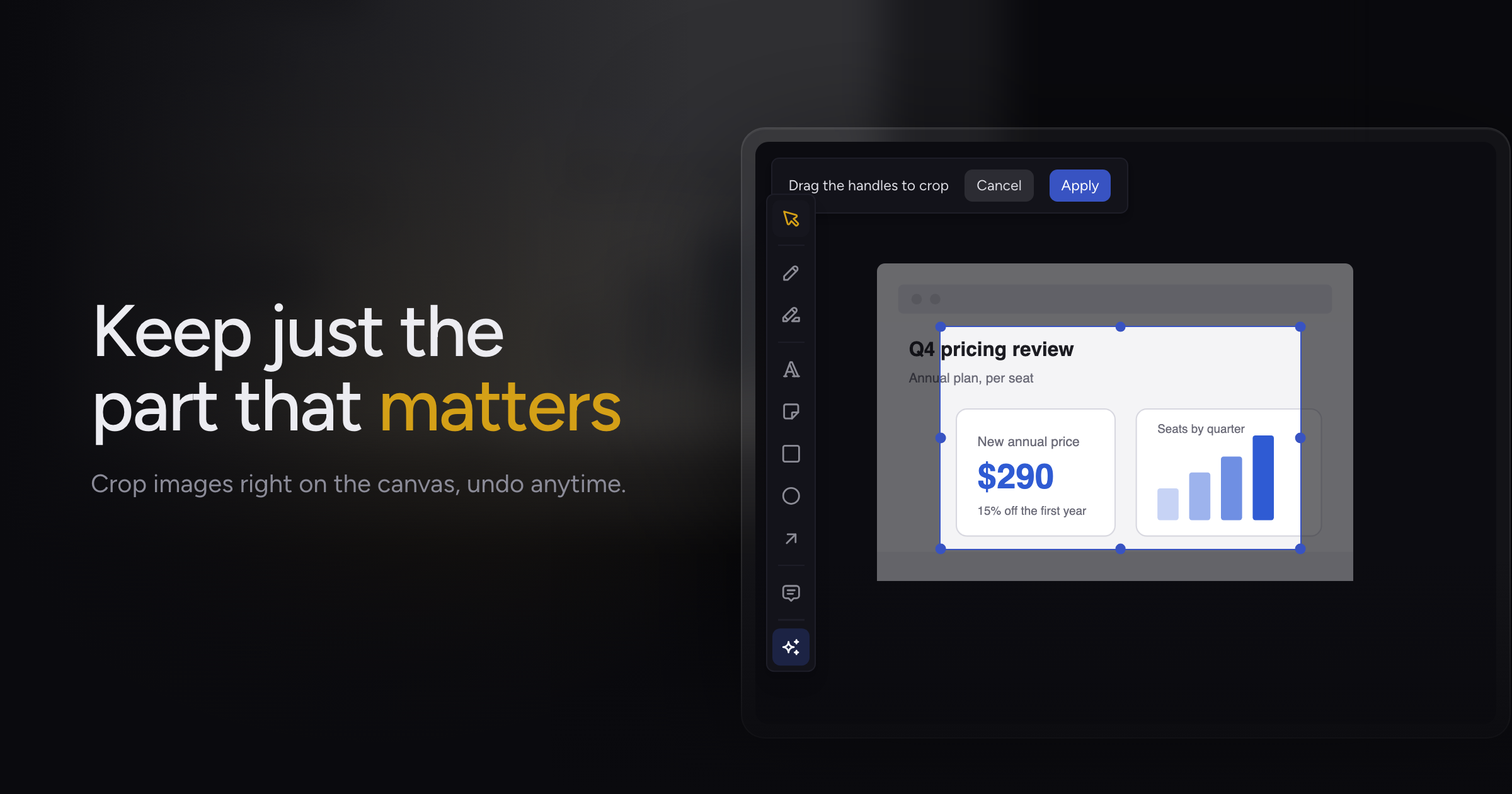
Canvases let you move and resize images but not trim them, so a mockup with a cropped screenshot meant building it somewhere else.
Today, we're adding canvas image cropping, along with speaker renaming after a call, screen context on Windows, chat links that open the chat, a jump row in Activity, upcoming calls on Home during a session, and a set of fixes.
Crop images on a canvas
Right-click an image on a canvas and pick Crop. Drag the handles to choose the part to keep, then apply, and the image shrinks to the area you kept. Everyone in the live session sees the crop, undo removes it, and exports carry it.
Chief keeps the original picture, so you can reopen the crop and drag it back out to the full image at any time.
While you crop, cut, copy, paste and select-all do nothing, so a stray shortcut cannot delete the image. Exports now fit each image inside the same padding and border the canvas shows, so uncropped images in exports sit slightly further in. Documents and canvases in a Live Session covers canvases.
Speaker names after a call
You can now name a speaker on the transcript after the call ends, both on the screen for the call you stopped and on a past session you open from the sessions list. The picker is the one you use during a call: pick a name and every line that speaker said changes and saves, or pick Same as Speaker N to make two speakers one.
After the call only the transcript changes; no voiceprint learns the name, and the prompt to combine voiceprints does not appear. Only the device that hosted the session can rename its speakers. How transcription works & speaker attribution covers speaker labels.
Screen context on Windows
On Windows, you can turn on screen context in a Live Session and Chief can see which allowed app you are in, its window title, and the page address in Chrome, Edge and Brave. Untick any app you want to keep from Chief.
Chief reads only web addresses, never the address bar, and never reads password managers. Windows reads whichever window is in front, so you cannot limit screen context to one screen there, and docked developer tools can hide a page's address. Sharing screen context covers both platforms.
Chat links that open chats
A chat link used to open Activity and leave you to find the row, and for anyone but the chat's owner it did nothing. It now opens that chat's tab and briefly lights its header, for anyone in the session, and the chat joins your chat list. A chat a collaborator started also comes back when you reopen the session.
A chat tab's … menu now holds Copy, Download, Copy link and Send to agent, and the paper-airplane button in the chat header is gone.
Share no longer appears in a chat tab's menu; use Copy link to share a chat. Notes and the Transcript keep Share on their own tabs.
Jump row in Activity
Activity has an Insights · Offers · Tasks row under its chips. Click a name to scroll to that part of the list, so your chats are a click away instead of at the bottom. The name for where you are stays lit as you scroll.
The row shows only when the session has at least two of these parts, and hides when you pin the panel to one kind.
Upcoming calls mid-session
While a Live Session runs, Home now shows your upcoming calls below the option to return to it. The call you are in does not appear as a meeting to join.
Fixes
- On the Minimal and Hidden settings for Manage Floating Control, Chief's cards stopped showing in the app. Those settings now apply only to the notch or floating bar, and cards still appear in the app.
- A document Chief could not save blocked Download, Copy and Start live session until restart. That document now shows a red error asking you to reopen it, and the other actions go ahead.
- Reopening a completed session showed "Credits used: 0". The header now shows the credits the session used.
- Calendar meeting cards appeared long after a call started and came back after you ignored them. The card now shows once, around the start of the meeting.
- After you left and rejoined a live session, Activity times bunched together. Each item now shows when it happened.
- Accepting an offer on an Activity card opened a chat tab. The work now runs on the card, which shows its progress, and a failed card has a Try again button.
- Opening a shared link brought Chief forward without entering the session. Chief now opens the live session, or the past view if the session has ended.
- Each column's tab dropdown showed even when all tabs fit. It now hides until tabs overflow and matches the size of the other small buttons.
- Pressing Make the mockup on the notch made a canvas out of view. Chief now comes forward to the new canvas.
- The Resume action on an ended session was easy to miss. It is now a green button at the top of the Session ended card.
Update to 1.1.54, open a canvas and right-click an image to crop it.