See every tag from your Live Sessions on the web Tags page
Every member can open a Tags page under Live Sessions to find each tagged point across recent calls and jump to the moment it was said, and the Live Sessions list loads faster. Private chats stay hidden from project owners, the marketing site shows the redesigned app, and fixes cover moving Live Sessions, Live Session chats, improved prompts, the prompt timeline, citation tooltips, switching chats and phone speaker labels.
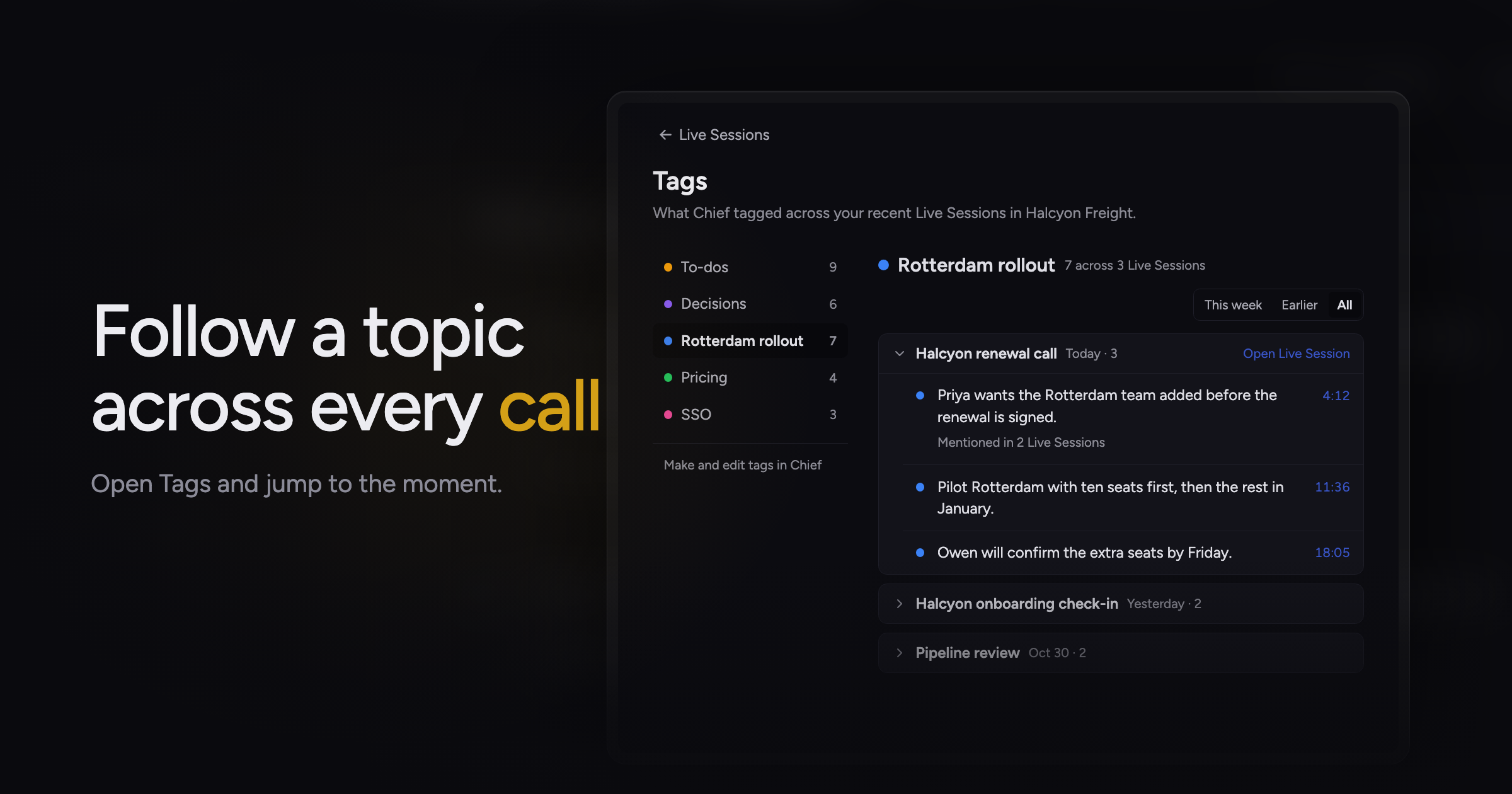
Finding every call where a topic came up, such as all the Greenland calls, meant opening the desktop app, because only it had a Tags page.
Today, we're adding the Tags page to the web, along with private chats that project owners cannot read, the redesigned app on the marketing site, and a set of fixes.
Tags page on the web
Open Tags under Live Sessions in the sidebar to see what Chief tagged across your recent Live Sessions in the project. Pick a tag, and its points appear indented under the Live Session they came from, newest call first.
Each point opens the Live Session at the moment it was said, and each group has an Open Live Session link. A point repeated in several calls shows once, under its newest mention, with a note of how many Live Sessions mentioned it. The When filter narrows the list to This week or Earlier.
The Live Sessions list, session mentions in the prompt bar and the Tags page also load faster.
The page covers your recent Live Sessions. You make and edit tags in the Chief desktop app, and the web page has no share link for a single tag.
Tags page uses
- A topic keeps coming up across calls: open its tag and read every point together, grouped by call.
- You need the exact words behind a decision: click the point and hear the moment Chief tagged it.
- You are catching up on Monday: switch When to This week and scan what each tag picked up.
Private chats hidden from owners
A private chat used to stay readable by a project Owner. Only you, and anyone you share it with, can open it today, whatever their role in the project.
Private chats show a lock beside their title in your chat list. On the usage page, a charge for someone else's private chat reads Private chat, keeps its credits, and has no link. Chats Chief runs for itself, such as a generated document, no longer appear in chat lists.
Task visibility: private, project & restricted covers who sees what.
Redesigned app on chief.bot
The product animations on chief.bot and its features, download and comparison pages show the redesigned Chief app. You see one Live Session screen with Notes, Transcript, Documents and Summary, and the Activity panel with Intelligence cards, Needs you and Done.
Fixes
- A chat someone else started during a Live Session didn't appear until you reopened the session. It shows up as it starts.
- Moving a finished Live Session as anyone but a project owner failed with a connection or permission error naming the wrong project. Only project owners can move a finished Live Session, and everyone else sees "Only project owners can move Live Sessions between projects."
- Improving a prompt that mentioned a file pulled the file's text into the suggestion. The suggestion keeps the file as a reference.
- Opening a chat with edited messages made the prompt timeline list prompts from every branch. The timeline shows only the branch you're viewing from the moment the chat opens.
- Markup a project member typed into a chat message could run when you hovered a chat citation that quoted it. The citation tooltip shows it as plain text.
- Switching to another chat could stall when the prompt bar closed. The switch completes and the new chat opens.
- Live Sessions recorded on a phone labeled speakers with skipped numbers. Chief numbers speakers 1, 2, 3 in the order they first speak.
Open Live Sessions in your project and pick Tags to see what Chief has collected. Auto-apply Tags covers how points get tagged.